Shortcuts
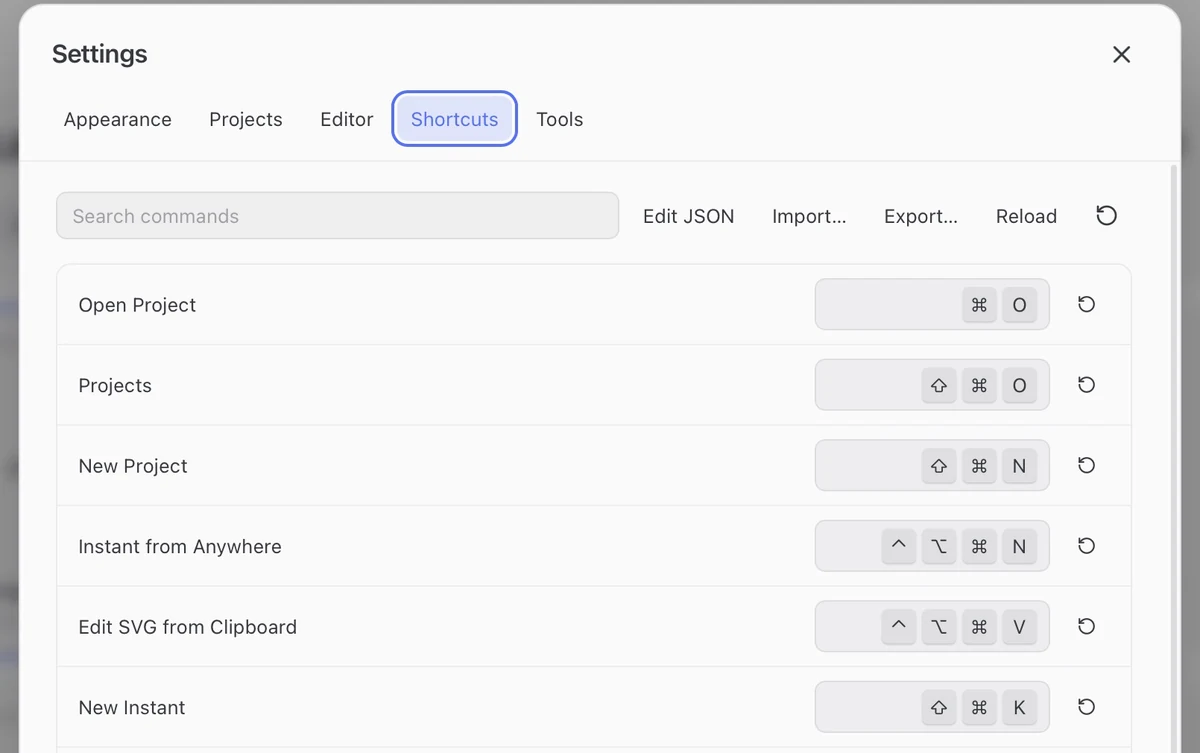
Customize a shortcut
The symbols below describe macOS defaults. On Windows, ⌘ means Ctrl, ⌥ means Alt, ⇧ means Shift, and the extra ⌃ modifier means Win. For example, Copy Image is Ctrl+Shift+C and Instant from Anywhere is Win+Alt+Ctrl+N. The app displays the keys for your platform.
- Open Settings (
⌘,) and choose Shortcuts. - Search for a command and click its assignment to record a new one.
- Use the row’s reset button to restore its default. Duplicate and reserved assignments are rejected.
Common commands
| Action | Default |
|---|---|
| Copy / Export image | ⇧⌘C / ⇧⌘S |
| Edit the selected Library card | ⌘E |
| Toggle Library / Source | ⌥⌘E |
| Toggle PDF | ⌥⌘P |
| Format source | ⇧⌥F |
| New Instant for the current workspace | ⇧⌘K |
| Instant from Anywhere, with FerMatter running | ⌃⌥⌘N |
| Edit SVG from Clipboard, with FerMatter running | ⌃⌥⌘V |
Window zoom
⌘+ / ⌘− / ⌘0 zoom or reset the whole interface.
Zoom one pane
| Pane | Controls |
|---|---|
| Projects or Library | Control + scroll over the pane |
Control + scroll, or ⌃⌘+ / ⌃⌘− / ⌃⌘0 (Fit) |
Display zoom is separate from output size.
Shortcut files
In Settings → Shortcuts, Edit JSON / Reload / Import… / Export… manages keybindings.json. Invalid files keep the last valid settings. Color palettes use a separate theme file.