Use FerMatter
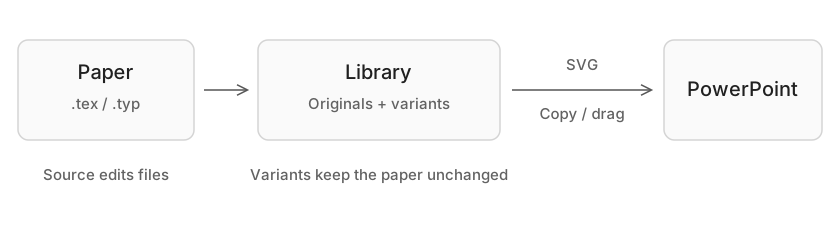
Before you start
Install and open FerMatter, then check the LaTeX or Typst requirements for your projects.
First launch
- Choose a default project folder. Windows preselects FerMatter in your local user folder and creates it when setup finishes. New projects and imports will be saved there.
- Review Compiler tools using the tool discovery guide.
- Open one of the four editable projects under Demos: LaTeX, Typst, TikZ or CeTZ. Follow From your paper to a slide to try it.
From standalone Instant, Demo projects opens this setup or returns to Projects.
Project folders
Change the default folder in Settings → Projects → Default project folder. Existing projects stay in their current locations.
| Action | Folder behavior |
|---|---|
Open Project (⌘O) | Opens an existing folder or main file in place |
New Project (⇧⌘N) | Creates a project from pasted source and a template; Location can override the default folder |
| Drop a folder / import a ZIP | Copies into the default project folder; an existing direct child opens in place |
Delete (⌘⌫, macOS) | Moves the actual source folder to Finder Trash; unavailable on Windows |
Project tabs retain their Library/Source view, open source files and PDF view. Opening the same project selects its existing tab.
ZIP imports
- Limits: 1 GiB per archive, 10,000 entries, 512 MiB of extracted files and 64 MiB of directory metadata.
- Multi-part archives and ambiguous ZIP end records are rejected. An otherwise valid archive can also trigger the end-record check if its comment or contents contain the same marker.
- If an archive is rejected, recreate the ZIP or extract it with your usual archive tool and use Open Project on the folder.
Continue by task
| Task | Guide |
|---|---|
| Find or edit an equation or drawing | From your paper to a slide |
| Exclude tables or custom environments from the Library | Card extraction |
| Choose image format, size and color; reopen SVG | Choose size and format |
| Change keyboard commands or display zoom | Shortcuts |
| Choose a theme, transparency or window pinning | Appearance |
| Connect a local agent | MCP |
| Check whether an error has been fixed in a newer release | Resolved issues |